
KMS and Encryption Key
This section details the Key Management System (KMS), including encryption key initialization and key rotation provided by LullaGateID.
Key Management System (KMS)
Sensitive information stored in the database, such as user account data, is automatically encrypted using the AES-256-GCM algorithm.
LullaGateID includes a built-in Key Management System (KMS) that supports encryption key rotation, helping you meet security and compliance requirements such as GDPR.
Before starting the system for the first time, you must generate an encryption key using the Admin Console after logging in. The generated key must then be assigned to the ENCRYPTION_KEY environment variable, which must be configured for both the Configuration Dashboard and the Gateway before they are started. This is the only encryption key that you must manually generate and manage. All other encryption keys described below are automatically generated and managed by the system.
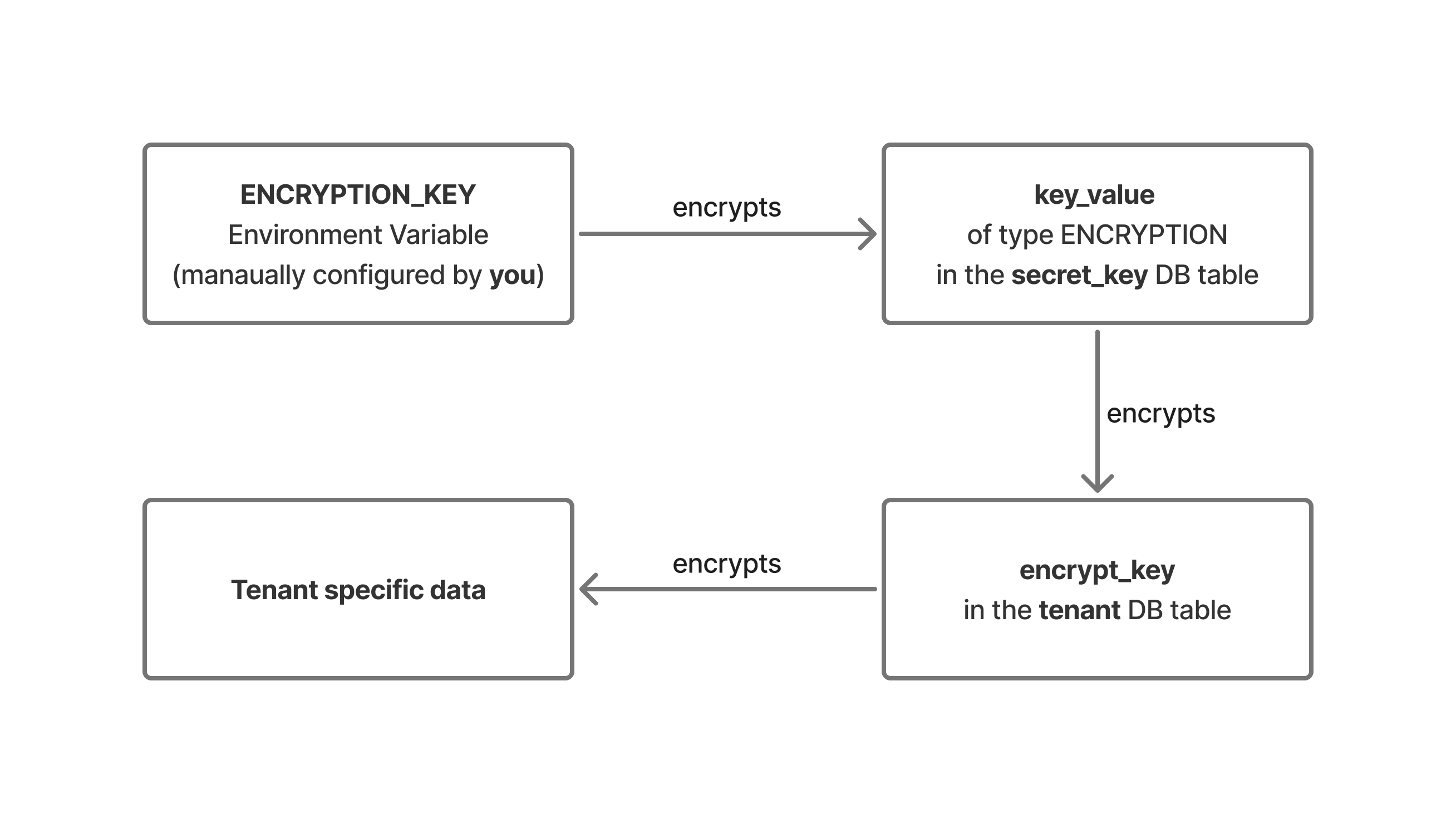
The ENCRYPTION_KEY environment variable is used to encrypt the key stored in the secret_key database table. The key of such table is then used to encrypt the encrypt_key value of each Tenant. Finally, each Tenant's encrypt_key is used to encrypt only the data belonging to that Tenant.
You are responsible for securely storing your
ENCRYPTION_KEYenvironment variable. For security reasons, the system does not store or provide any mechanism to recover this key. If it is lost, it cannot be recovered, and access to your encrypted data may be permanently lost.
Encryption Key Initialization
When the system starts for the first time, the Gateway must be the first application to start. The Gateway connects to the database and checks whether an encryption key already exists in the secret_key table. Since this table is empty during the first startup, the Gateway generates a new encryption key. Before storing this key in the database, it is encrypted using the ENCRYPTION_KEY environment variable.
Once the Gateway has successfully started and initialized the encryption key in the database, the Configuration Dashboard can be started. It loads the encrypted key from the database and decrypts it using the ENCRYPTION_KEY environment variable.
The encryption key initialization process is handled automatically by the system. You only need to configure the
ENCRYPTION_KEYenvironment variable.
Encryption Key Rotation
To help meeting security and compliance requirements, the system supports automatic rotation of the ENCRYPTION_KEY environment variable. This key is the master encryption key of the system and is the only encryption key that requires manual rotation to increase security.
Encryption key rotation operations are handled exclusively by the Gateway and are not performed by the Configuration Dashboard.
To rotate the encryption key, first assign the current ENCRYPTION_KEY value to the OLD_ENCRYPTION_KEY environment variable in the Gateway. Then, generate a new encryption key value using the Admin Console, assign the new value to the ENCRYPTION_KEY environment variable, and restart the Gateway using the updated environment configuration.
Every time the ENCRYPTION_KEY value is changed, the key version stored in the secret_key table is automatically incremented by 1.
After the rotation is completed, the new
ENCRYPTION_KEYvalue must also be set for the Configuration Dashboard.
The rotation process is handled automatically by the system. You only need to configure the environment variables as described above and restart the Gateway with the new values.
Updated about 1 month ago