
Regular - General Flow
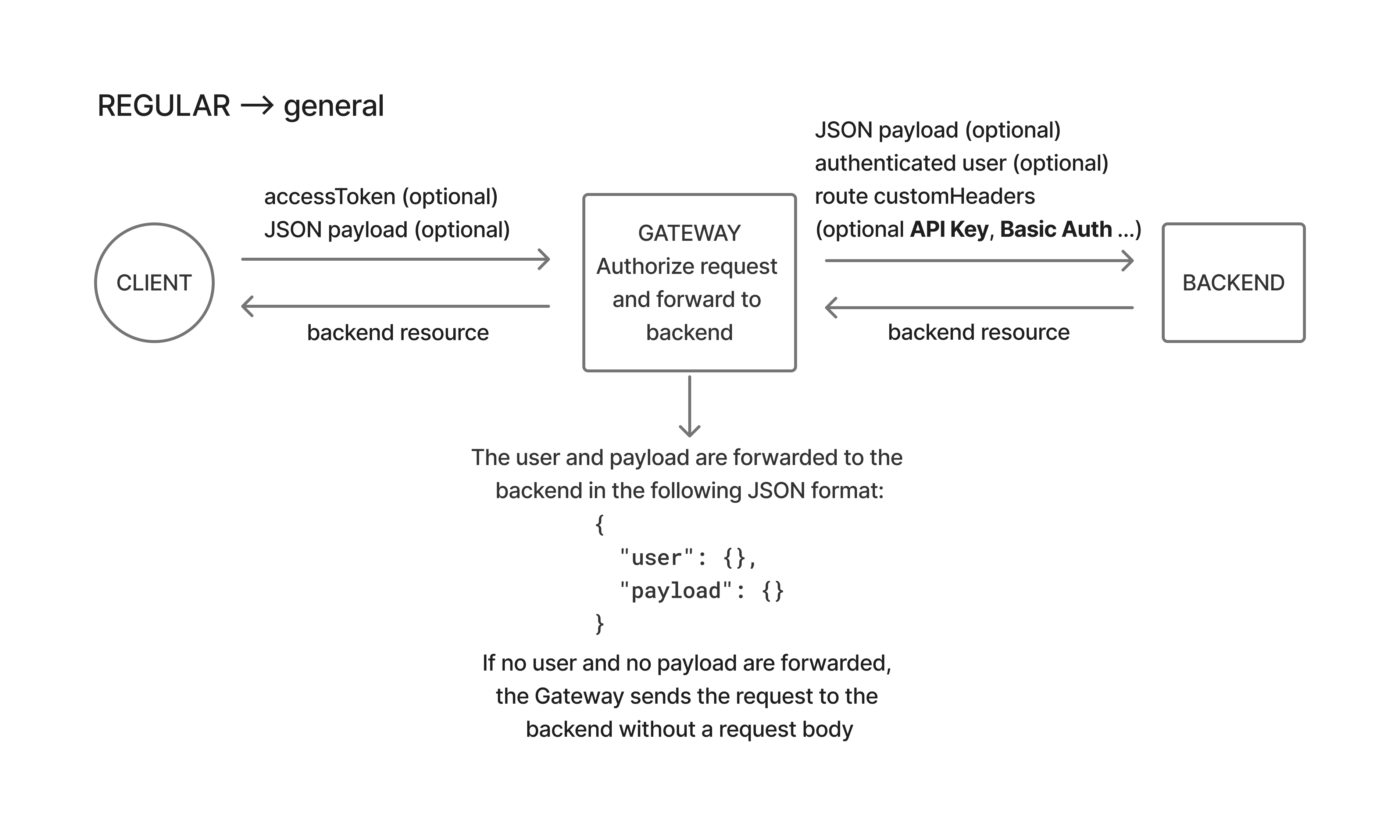
With this API, you send a request to the Gateway, which authorizes and forwards it to the configured backend service.
Prerequisites
- Before calling this API, ensure you have created and activated a Tenant whose
appIdmatches theApp-Idheader of this request. The correctappIdvalue can be retrieved from theTenantResourcereturned by the Dashboard API. - You must also have created and activated a
REGULARtype Route whoseappRouteIdmatches theApp-Route-Idheader, and whose HTTPmethodandpathmatch those of this request. The correctappRouteIdvalue can be retrieved from theRouteResourcereturned by the Dashboard API.
OneREGULARRoute for Each Backend EndpointFor each endpoint that the Gateway must forward to your backend, you must create a corresponding
REGULARtype Route.For example, if your backend exposes
GET/productandGET/order, you must create twoREGULARtype Routes: one forGET/productand one forGET/order.
Base URL
https://your-gateway-hostRequired Headers
App-Id: app-xxxxxxxx
App-Key: key-xxxxxxxx
App-Route-Id: route-xxxxxxxx
Optional Headers
Authorization: Bearer YOUR_ACCESS_TOKEN
Content-Type: application/json
Client Headers
Any additional headers added by you on the client side will be forwarded to the backend service, except for headers that can not be forwarded according to the HTTP specification, such as hop-by-hop headers.
The
App-Id,App-Key,App-Route-Id, andAuthorizationheaders are not forwarded to the backend service. These headers are intended for communication with the Gateway only and are excluded from the forwarded request to prevent exposing sensitive credentials.
Gateway-Managed Headers
Headers configured in RouteConfig.customHeaders are added automatically by the Gateway when forwarding the request to the backend service.
You must not add these headers to your client request, as they are intended to be set by the Gateway in the request to the backend.
RouteConfig.customHeaders may include API keys or Basic Authentication credentials used by the Gateway to authenticate with the backend.
Method and Path
Use the HTTP method and path specified in the activeConfig field of the Route.
Both method and path will be forwarded to the backend service.
If the Route path contains a dynamic path placeholder, make sure to replace it with an actual value before making the request.
For example:
GET /product/{id}becomes:
GET /product/123Query Parameters
You can add any query parameters to the request. They will be forwarded to the backend service.
Request Body: Client to Gateway
You can include any custom JSON body in the request to the Gateway, which we refer to as the payload.
Request Body: Gateway to Backend
The Gateway forwards the following JSON object to the backend service:
{
  "user": {
    "username": "username",
    "authorities": ["USER"],
    "data": { },
    "confirmed": true
  },
  "payload": { }
}usercontains the authenticated user derived from the access token, if the Route is configured to require authentication and to forward the user to the backend:RouteConfig.auth.isRequired = trueRouteConfig.forwardUser = true
payloadcontains the custom JSON body provided in the request to the Gateway.
If no user and no payload are forwarded, the Gateway sends the request to the backend without a request body.
Response
The Gateway forwards the response from the backend service directly to the client.
Request Flow
Updated about 1 month ago